

Product options and variants
Options are the dimensions of a product — like Size or Color. Variants are the actual buyable combinations of those options, each with its own SKU, price, and stock. In CIQRA you define the options once, then generate every variant in a single step.
Where variants live
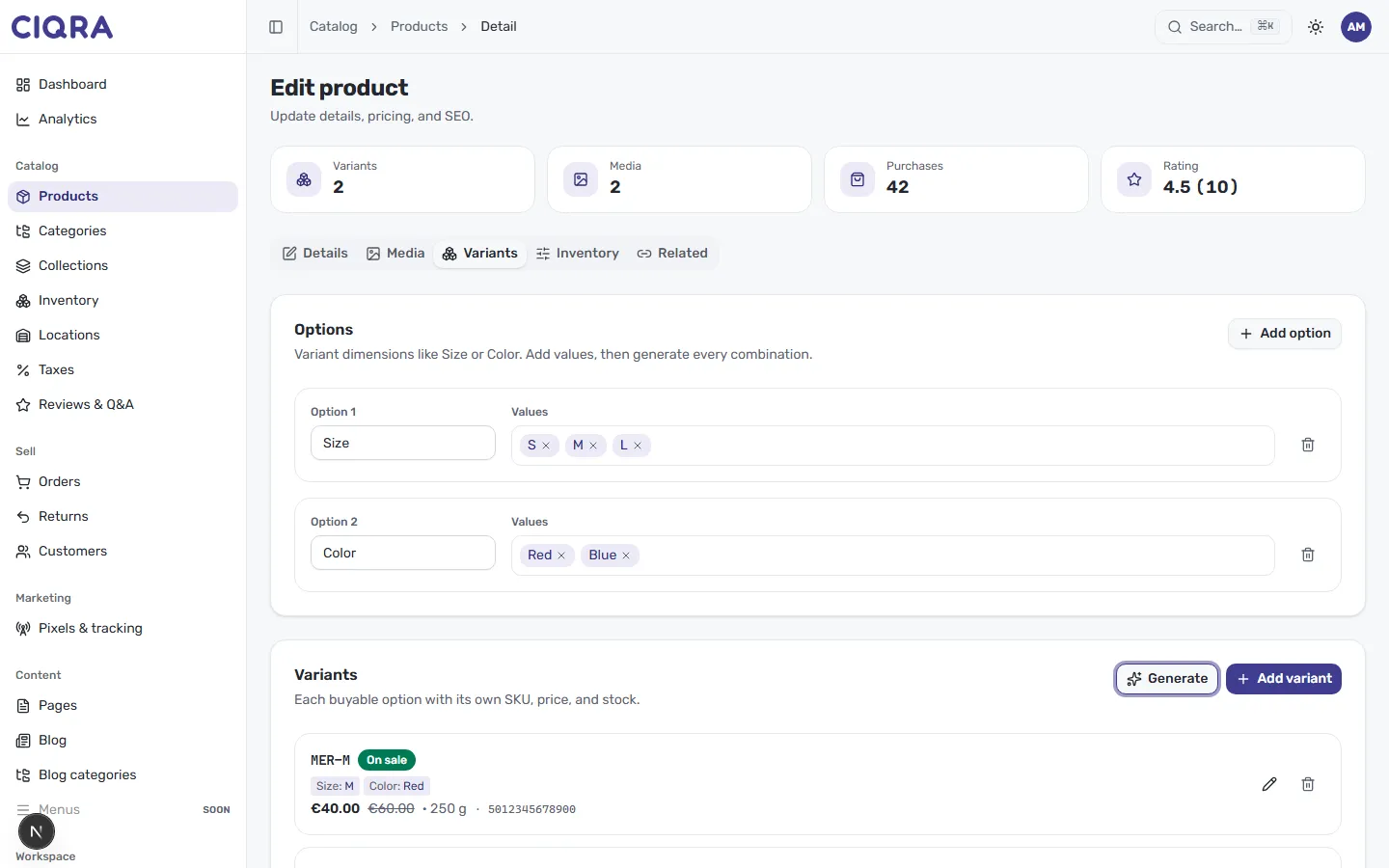
Section titled “Where variants live”Open a product and select the Variants tab. It has two parts: Options at the top, and the generated Variants below.
Add options and values
Section titled “Add options and values”The Options panel describes “variant dimensions like Size or Color. Add values, then generate every combination.”
- Select Add option to create a new dimension.
- Give it a name in the option field — for example, Size.
- In the Values field, add each value as a chip:
S,M,L. Remove a value with the × on its chip. - Repeat for a second dimension if you need one — for example an option named
Color with the values
RedandBlue.
Each option row has a delete (trash) control to remove the whole dimension.
Generate the variants
Section titled “Generate the variants”The Variants section holds “each buyable option with its own SKU, price, and stock.” Once your options and values are in place, select Generate to create a variant for every combination — for example, Size × Color produces one variant per pairing. Use Add variant if you’d rather add a single variant by hand instead.
What each variant carries
Section titled “What each variant carries”A generated variant row shows the attributes that make it a distinct, sellable item. In the example, the variant MER-M displays:
- A SKU (for example
MER-M) to identify it in inventory and orders. - An On sale badge and its price, with a struck-through compare-at price (for example €40.00 was €60.00).
- The option values it represents — Size: M, Color: Red.
- A weight (250 g) and a barcode (for example an EAN like
5012345678900).
Use the pencil icon on a variant to edit it, or the trash icon to remove it.
Simple products still have a variant
Section titled “Simple products still have a variant”Even a product with no options carries a single variant — that’s what holds its price and stock. When you create a product, CIQRA starts you with one variant so there’s always something buyable. Add options later if the product grows into multiple sizes or colors.