

Pause or turn off a destination
Sometimes you want to stop sending conversions to a platform without tearing down its setup — you’re pausing a campaign, testing something, or winding down spend on a channel. CIQRA handles this with a simple on/off toggle on each destination card, so pausing is one click and nothing you’ve configured is lost.
Open Pixels & tracking from the Marketing group in the left navigation.
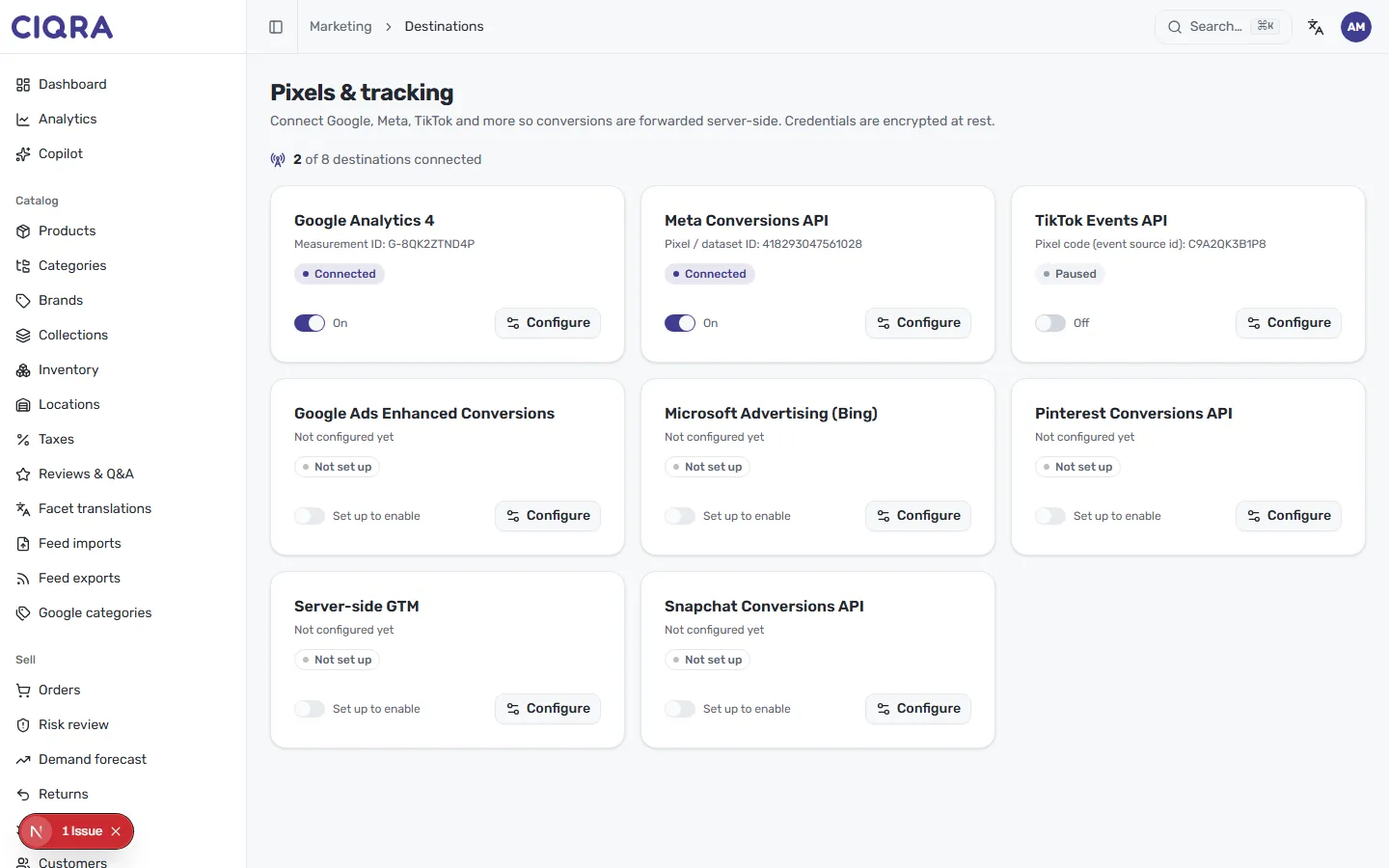
The on/off toggle
Section titled “The on/off toggle”Every card that’s been configured carries an on/off toggle:
- Flip it On and CIQRA forwards conversions to that destination — the card reads On and its badge shows Connected.
- Flip it Off and forwarding stops immediately — the card reads Off and its badge changes to Paused.
Turning a destination off doesn’t erase anything. Your identifier and encrypted secret stay saved, so switching it back on later resumes forwarding without re-entering credentials.
Reading the three states
Section titled “Reading the three states”The badge on each card tells you exactly where a destination stands:
- Connected — configured, enabled, and actively forwarding conversions.
- Paused — fully configured, but its toggle is off, so nothing is being sent right now. This is the state you land in when you turn a live destination off.
- Not set up — never configured. These cards show Not configured yet and their toggle is inactive with a Set up to enable label — you can’t turn a destination on until you’ve configured it and saved a valid setup.
Fully stepping away from a platform
Section titled “Fully stepping away from a platform”If you’re leaving a platform for good, pausing it is enough to stop all forwarding — the destination simply sits in the Paused state and sends nothing. Your stored secret stays encrypted at rest and is never displayed, so it isn’t exposed while the destination is idle.
Turning it back on
Section titled “Turning it back on”To resume, open Pixels & tracking, find the paused card, and switch its toggle back On. It’s worth sending a fresh test event afterwards to confirm everything still delivers — see Verify tracking with test events.